Kiwi for Gmail 3.0 has finally arrived on the Mac App Store.
What is Kiwi for Gmail 3.0
Our new version is a complete rewrite of Kiwi for Gmail which allows us to better support both Mac and Windows, without separation of features and functionality. It allows us to add new features more easily, fix bugs quicker, and generally allows us to do more.
You will see some changes to the UI in some places, but generally, it should feel familiar to use.
We have now moved completely to a subscription-based service, which we had been doing on our Windows version for a while. This allows us to continue supporting Kiwi for Gmail and to add more features.
License association - Kiwi Accounts
When you first launch Kiwi for Gmail you will be asked to log in using a Google account. This will be the account that your license will be associated with within our system. It is the account you should use to log in on our website or when you need to use Kiwi on another machine etc.
You can change the email that is associated with your account by contacting our support team at support@kiwiforgmail.com.
Subscribing to Kiwi for Gmail - In-App Purchase - Mac App Store
You can sign up for our Premium or Business tiers using the in-app functionality accessible from the Help menu. Select the plan that you wish to subscribe to and follow the prompts to complete your transaction.
Please note that we currently do not support trial dates for in-app purchases and once you complete the process your iTunes account will be billed for the subscription immediately.
When purchasing using Apple's in-app purchasing system, you must contact them for any support regarding payment.
Can I add additional users to my MAS subscription?
No, MAS purchases don't support multiple seats or users and are for individuals only. If you wish to add multiple seats, or for use for your business or team please subscribe via our website.
Subscribing to Kiwi for Gmail - Website
You can also sign up for our Premium or Business tiers via our website. Visit www.kiwiforgmail.com/pricing to select your plan. Log in using your Kiwi for Gmail account and follow the steps to complete your transaction. All plans via our website offer 15-day trials and can be canceled at any time during that period to not incur a charge.
Existing users of Kiwi for Gmail
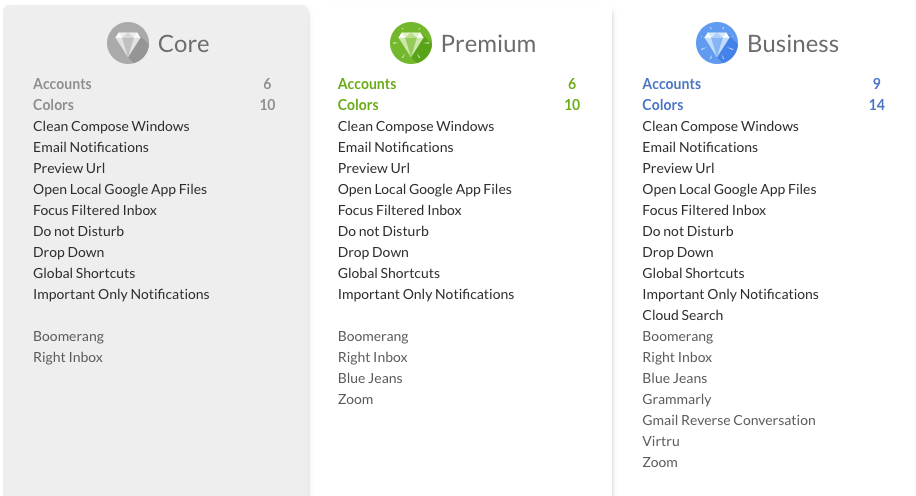
If you purchased Kiwi for Gmail before the 3.x update you will automatically be placed on a free tier of our product (Core) that offers on par features and functionalities as before. This is tied to your Mac App Store purchase and can only be used to create a single account.
Why do I need to add all my accounts?
As this is a complete rewrite of all systems, the old app and its settings and configurations are not compatible with our new system. All users will be required to add their accounts again, but this should only take a minute or two, based on how many accounts you have.
Can I use Kiwi on other machines?
Yes - you can use Kiwi for Gmail on your Mac or Windows machines. Just download Kiwi for Gmail again on your other computer(s) and log in using your Kiwi account.